
Standard
One portal on two connected apps, with the AI page builder.
SecureSync brings your CRM, billing, support, projects and files together and keeps them in sync. From there, give each client a portal built by AI, report across every app and keep a daily backup. Live today with Zoho CRM, Books, Billing, Desk, Projects, Sign and WorkDrive.
7-day free trial. No credit card needed.
 CRM
 Books
 Billing
 Desk
 Sign
 WorkDrive
 Projects
Zoho Forms, Bookings and Analytics embed on any portal page. QuickBooks, HubSpot, Salesforce and more are on the way. What syncs from each app
Your CRM, billing, support desk, projects and files each hold part of the picture. SecureSync syncs them into one place, so your client portals, reports and backups all work from the same up-to-date data. Our team sets it up with you.
Using a system we don't connect to yet? Ask us and we'll help bring its data in.
Describe a page and the AI page builder builds it from your synced data. Each client logs in under your brand to their own invoices, tickets, projects and files, and the AI client assistant answers their questions from the same records.
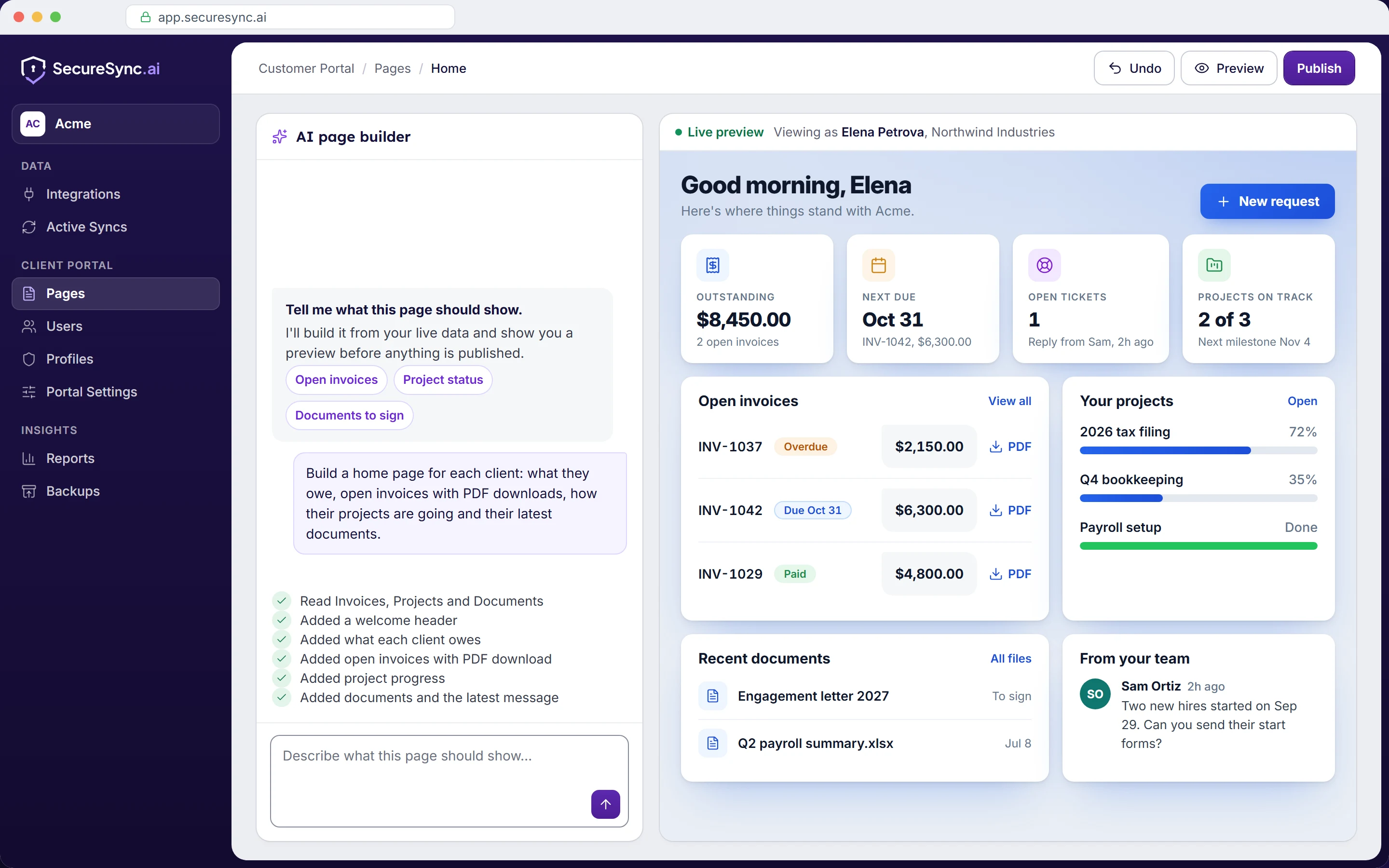
The AI page builder is included on every plan. The AI client assistant is included on Professional and Enterprise, and $100/mo on Standard.
One report can combine invoices, deals, hours and tickets without an export. Keep it for your team, email it on a schedule, or share it into the portal so each client sees only their own rows.
Your apps are already connected, so SecureSync keeps a daily backup too. Restore one record, a module or a whole app straight back into Zoho, or export it.
Your team works in Zoho CRM too. Canvas Studio designs the deal, account and contact pages they see there: describe the page you want, preview it on a real record and publish it to the profiles you choose. Included on every plan for a limited time.
The same data does a different job in each business. Here's what the client portal looks like in four of them.
Clients upload their records to their own folder, sign engagement letters and see their invoices.
Clients follow projects, comment on tasks, raise requests and pay invoices in one place.
Clients raise and follow tickets, see their subscriptions and pay what's due.
Clients see where each engagement stands, find every deliverable and sign off on work.
Bringing your data together only works if it's kept safe, and if each client sees only their own.
How we protect your dataThe AI page builder and our team's help come with every plan, and for a limited time so do Reports, Canvas Studio and Backups. Save 15% when you pay yearly.
SecureSync brings the apps your business runs on, such as your CRM, billing, support desk, projects and files, into one place and keeps them in sync. From there you can give each client a portal built by AI, where they see and update only their own records; report across every app; and keep a daily backup you can restore from. It's live with Zoho today, with more platforms on the way.
Seven Zoho apps sync into your portal: CRM, Books, Billing (formerly Subscriptions), Desk, Sign, WorkDrive and Projects. Zoho Forms, Bookings and Analytics can be embedded on any portal page, and embedded apps don't count towards your connected app limit. QuickBooks, HubSpot, Salesforce, Zendesk and SharePoint are in development. See all integrations.
Zoho's portals are built one app at a time: CRM, Books and Desk each have their own, with a separate login and limited control over layout and permissions. Zoho Creator can join your apps up, but someone has to design, code and maintain the app, its sync and its permissions, and keep doing so as your business changes. SecureSync gives you all of that ready to use:
No. Each portal user is linked to their own contact and account records. Every list, report, file and AI client assistant answer is filtered to those records. You decide what each type of client can see, down to individual fields, and each SecureSync customer gets its own database.
Yes. Click around three example portals, built for a tax and accounting firm, a marketing agency and an IT services firm. Each one uses the same building blocks your own portal would, and nothing you do in them is saved or sent. Open the tax and accounting portal.
You get 7 days free, with no credit card needed. Connect your apps, build a portal and invite your first clients. Reports, Backups and Canvas Studio are switched on from day one; during the trial, Canvas Studio is limited to one canvas. Want to try the AI client assistant too? Just ask us to switch it on.
Book a demo and we'll connect your apps and build a portal page or a report on your own data while you watch, or start a 7-day free trial with no credit card needed.
Have a question first? Send us a message